


Help Center
-
Free-standing Kitchens
-
Design Your Kitchen
-
Online Kitchen Planner
-
- What is the Canvas?
- What do each of the buttons do?
- What can you use custom units for?
- Can I see diagrams of the units?
- When do you use extras on your plan?
- How do you start a new plan?
- How do you continue with an existing plan?
- What do you use the ruler for?
- Can I move multiple units at once on the canvas?
- How do I download the layout so that I can print it?
- How to I submit my layout to get a quote?
-
Construction
-
Costs
-
Ordering
-
Delivery
-
Kitchen Installation & Maintenance
-
Environment & Community Impact
What can you use custom units for?
Custom units allow you to add units that are different from the standard Milestone Kitchens units. Here are a few ways you could use this button:
- Although the Raw Range option is not currently available in the kitchen planner, you can still use the custom unit option to add in the dimensions of the Raw Range units you prefer. To do this, refer to the Raw Range illustrated price list and make a note on the planner next to each of the custom units, using the text icon to mention which Raw Range units you have chosen.
- Add in existing units that you would like to keep in your kitchen. For example, you might want to keep your vintage Coffee Dresser in your kitchen.
- It can be used to incorporate the dimensions of various decor items such as a pot plant. Make a note on the custom unit indicating that it is for a pot plant or other décor item.
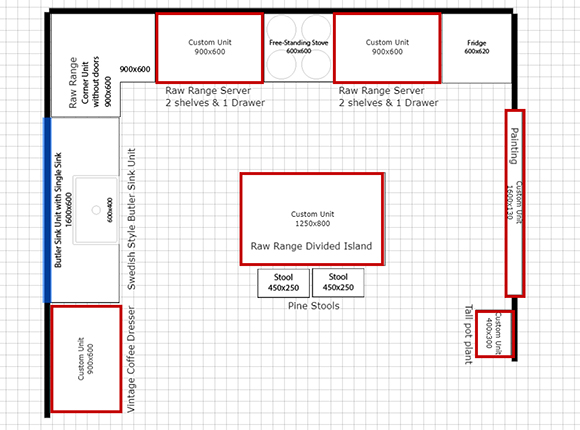
Custom Unit Examples
Quick Links